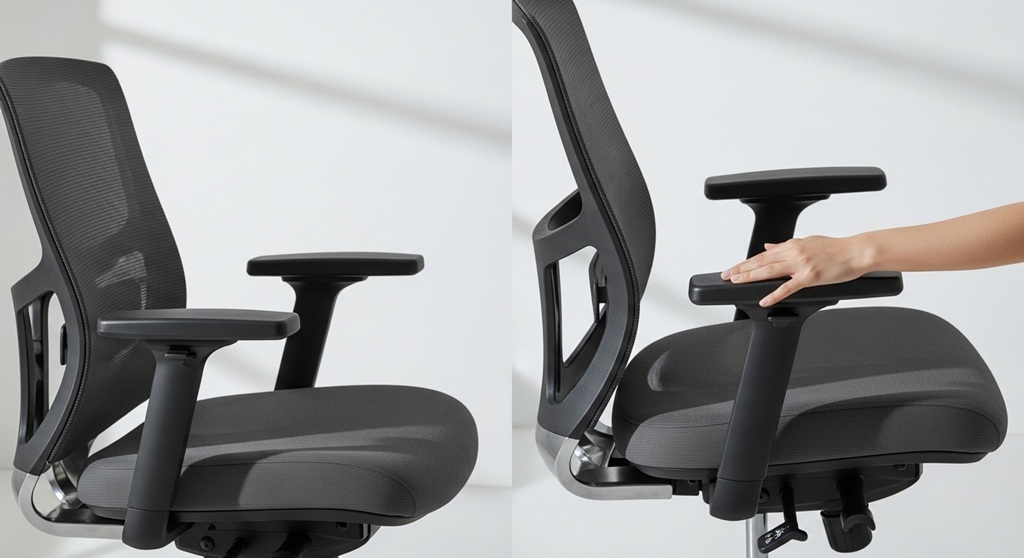
Many people spend more than 8 hours a day sitting at a desk. According to research published by the National Library of Medicine, prolonged sitting combined with poor ergonomics can increase the risk of musculoskeletal discomfort, especially in the shoulders, neck, and wrists. One feature that significantly improves sitting comfort is adjustable armrests.
Adjustable armrests allow users to position their arms at a natural angle, reducing strain on the upper body. When paired with features like an adjustable seat height chair and lumbar support, they create a balanced sitting posture that supports productivity and long-term health.
Modern ergonomic chairs often include advanced options such as 3D armrests, which allow adjustments in height, depth, and angle. These small adjustments help users customize their seating position based on their body size and desk setup.
If you are exploring ergonomic seating options, you can review models that include these features such as
3D armrests
in modern office chairs designed to support posture and daily comfort.
In this guide, we explain how adjustable armrests work, why they matter for workplace ergonomics, and how they contribute to improved comfort during long working hours.
Why Do Office Workers Experience Shoulder and Arm Fatigue?
Short answer: Shoulder and arm fatigue often occur because the arms are unsupported while typing or using a mouse.
When armrests are fixed or poorly positioned, the shoulders must carry the full weight of the arms. On average, a human arm weighs around 5–6% of total body weight. For a 70 kg adult, that means each arm can weigh around 3–4 kg.
Holding that weight unsupported for hours creates continuous strain on the shoulder muscles and trapezius region. Over time, this leads to:
- Shoulder stiffness
- Neck pain
- Upper back fatigue
- Reduced typing efficiency
A case study conducted by Cornell University’s Ergonomics Research Group found that employees using ergonomic chairs with proper arm support reported up to 27% less shoulder discomfort compared to those using fixed-arm chairs.
This highlights why adjustable armrests are not just a comfort feature. They are an ergonomic necessity for long working sessions.
How Do Adjustable Armrests Reduce Upper Body Strain?
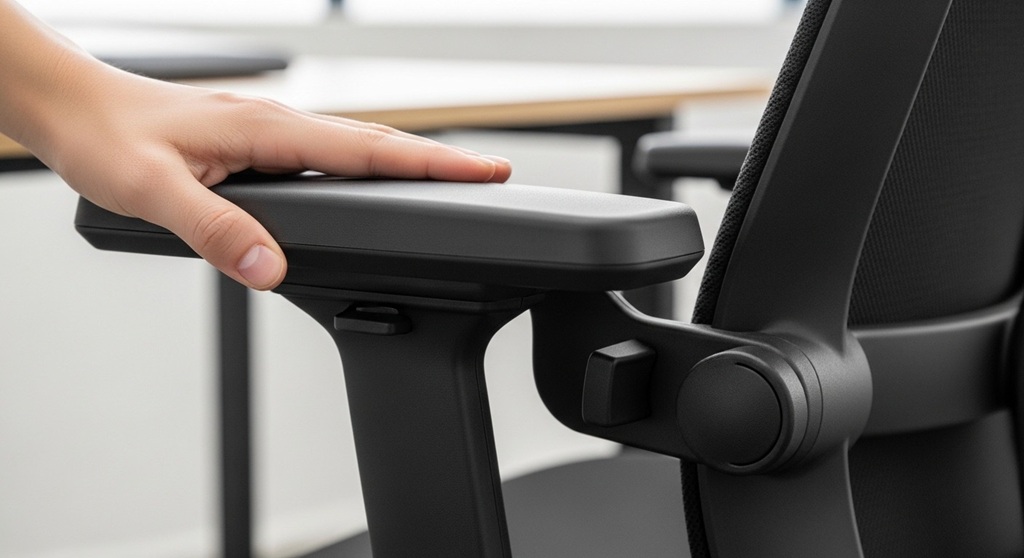
Short answer: Adjustable armrests support the arms and keep the shoulders in a neutral position.
Proper arm positioning reduces muscle activity in the shoulders and neck. When the forearms rest comfortably on armrests, the body maintains a neutral posture.
Here is how adjustable armrests improve posture:
- Support the forearms during typing
- Reduce shoulder elevation
- Prevent wrist overextension
- Maintain elbow angle around 90 degrees
Ergonomic guidelines from OSHA recommend keeping elbows close to the body with forearms parallel to the desk. Adjustable armrests make this positioning possible across different body types and desk heights.
Without adjustment, users often compensate by raising their shoulders or leaning forward, which creates tension in the upper spine.
What Are 3D Armrests in Office Chairs?
Short answer: 3D armrests allow adjustments in three directions: height, forward/backward depth, and side angle.
Traditional office chairs typically offer fixed or height-only armrests. In contrast, modern ergonomic chairs use 3D armrests to allow multiple positioning options.
| Armrest Type | Adjustments Available | Benefits |
|---|---|---|
| Fixed Armrests | None | Limited comfort and posture control |
| Height Adjustable | Up and Down | Supports elbow positioning |
| 3D Armrests | Height, Depth, Angle | Full customization for typing and mouse work |
| 4D Armrests | Height, Depth, Width, Angle | Advanced ergonomic flexibility |
3D armrests are especially useful for professionals who perform computer-intensive tasks such as graphic design, programming, customer support, or remote work.
They allow users to adjust arm placement based on keyboard position, mouse usage, and desk height.
How Does an Adjustable Seat Height Chair Work with Armrests?
Short answer: Proper seat height aligns the elbows with adjustable armrests and desk height.
Ergonomic seating works best when multiple adjustments are used together. One of the most important features is an adjustable seat height chair.
The recommended sitting posture includes:
- Feet flat on the floor
- Knees at approximately 90 degrees
- Elbows aligned with desk height
- Forearms supported by armrests
If the seat height is too low, armrests become ineffective because the desk remains higher than the elbow level. If the seat is too high, the user may experience leg pressure or circulation issues.
The ideal ergonomic setup is achieved when seat height and armrest height are adjusted simultaneously.
This alignment keeps the wrists neutral while typing and reduces tension across the upper body.
Do Adjustable Armrests Improve Productivity?
Short answer: Yes. Proper arm support reduces fatigue and helps maintain focus during long work sessions.
Several workplace productivity studies show that ergonomic improvements can increase work efficiency.
A well-known workplace ergonomics study conducted by the Washington State Department of Labor found that ergonomic seating improvements led to:
- 17% reduction in musculoskeletal discomfort
- 12% improvement in typing performance
- Reduced breaks caused by fatigue
When the body is supported correctly, employees can work longer without discomfort interruptions.
Adjustable armrests help achieve this by:
- Reducing muscle fatigue
- Improving wrist alignment
- Encouraging upright posture
- Supporting relaxed shoulders
These factors collectively improve both comfort and productivity.
Who Benefits the Most from Chairs with Adjustable Armrests?
Short answer: Anyone who works long hours at a computer benefits from adjustable armrests.
However, certain professionals rely on them even more due to the nature of their work.
- Remote workers
- Office employees
- Programmers and developers
- Designers and editors
- Customer support agents
- Students attending online classes
In remote work environments, people often use desks that were not originally designed for office tasks. Adjustable armrests help compensate for these differences by allowing flexible positioning.
This adaptability is especially valuable in home office setups where desk height cannot always be modified.
How Should Adjustable Armrests Be Positioned?
Short answer: Armrests should support the forearms while keeping shoulders relaxed and elbows at roughly 90 degrees.
Follow these ergonomic positioning steps:
- Adjust seat height first
- Raise armrests until elbows rest comfortably
- Keep shoulders relaxed, not lifted
- Position armrests close to the body
- Align forearms parallel with the desk
Users should avoid leaning heavily on armrests while typing. Instead, armrests should lightly support the arms between tasks.
This approach maintains natural posture without restricting movement.
Conclusion: Why Adjustable Armrests Are Essential for Office Comfort
Comfort at work is not determined by a single feature. It results from a combination of ergonomic adjustments that support the body throughout the day. Adjustable armrests play a major role in this system.
By supporting the arms and reducing shoulder strain, they help prevent common issues such as neck stiffness, upper back pain, and typing fatigue. Features like 3D armrests allow precise customization, making it easier to maintain proper posture regardless of body size or desk height.
When combined with an adjustable seat height chair, ergonomic armrests create a balanced sitting posture that improves both comfort and productivity.
If you are upgrading your workspace, choosing an ergonomic chair with adjustable armrests can make a noticeable difference in daily comfort. Explore reliable options and compare ergonomic features before making a decision.
A well-designed chair is not just furniture. It is an investment in better posture, reduced fatigue, and long-term workplace health.
Frequently Asked Questions (FAQs)
1. Are adjustable armrests necessary in office chairs?
Yes. Adjustable armrests support the arms and reduce shoulder strain during long computer sessions. Without arm support, the shoulders carry the weight of the arms, leading to fatigue and discomfort.
2. What are 3D armrests?
3D armrests allow three types of adjustments: height, forward/backward movement, and angle rotation. These adjustments help users align their arms with their keyboard and desk position.
3. How high should armrests be?
Armrests should be positioned so that elbows remain close to the body at roughly a 90-degree angle. Shoulders should stay relaxed, not elevated.
4. Do armrests help prevent neck pain?
Yes. Proper arm support reduces tension in the shoulders and upper back, which can help prevent neck strain caused by unsupported arms.
5. Can adjustable armrests improve posture?
Yes. By supporting the forearms and keeping shoulders relaxed, adjustable armrests encourage a neutral sitting posture that protects the spine and upper body.
6. Are adjustable armrests useful for gaming chairs?
Yes. Gamers often sit for extended periods similar to office workers. Adjustable armrests help maintain comfort during long gaming sessions by supporting the arms and reducing fatigue.
7. Do all ergonomic chairs include adjustable armrests?
No. Some basic ergonomic chairs only offer fixed armrests or height adjustment. Higher-end ergonomic chairs typically include 3D or 4D armrest functionality for greater customization.
Related Topic: Hair Transplant Financing Options Default Risk Prevention Strategies
Read Next: How to Start Your Own Lawn Mowing Business: A Hands-On Guide for 2025